

Artificial Intelligence tools are changing the way people work, learn, build projects, and write code. One of the most powerful AI tools available today is Anthropic’s Claude AI. It is designed to help with writing, coding, research, automation, business tasks, and even building AI-powered applications.
Many beginners only use Claude AI for simple questions. But professionals use it in a much smarter way. They know how to write better prompts, organize projects, and use advanced features to save time and improve results.
This guide explains how to use Claude AI professionally in simple English.
—
# 1. The Basics: Prompting
The most important skill in Claude AI is prompting. A prompt is simply the instruction you give to the AI.
Claude AI gives better answers when your instructions are clear and detailed.
## Bad Prompt Example
“Write code for a website.”
This prompt is too short and unclear.
## Better Prompt Example
“Create a responsive landing page using HTML, CSS, and JavaScript for an AI startup company. Use a modern dark theme with smooth animations and a hero section.”
This second prompt gives:
* The purpose
* The technology
* The design style
* The expected output
Because of this, Claude AI can generate much better results.
# Use Step-by-Step Instructions
Professionals often break tasks into steps.
Example:
1. First create the UI
2. Then add backend logic
3. Then optimize the code
4. Finally explain the project structure
Claude performs better when tasks are organized.
# Ask Claude AI to Act Like an Expert
You can assign roles inside prompts.
Examples:
* “Act as a senior software engineer.”
* “Act as a professional UI/UX designer.”
* “Act as an AI architect.”
* “Act as a startup consultant.”
This changes the style and quality of the response.
# Use Context Properly
Claude AI remembers information inside a conversation. Professionals use this to build long projects.
For example:
* Share your project idea
* Explain your folder structure
* Add your existing code
* Then ask Claude to continue building
This creates more accurate and connected outputs.
# 2. Using Advanced Features
Most users only use basic chat. But Claude AI has advanced capabilities that are extremely powerful.
## Large Context Window
Claude AI can understand very large amounts of text compared to many other AI tools.
You can upload:
* PDFs
* Research papers
* Project documentation
* Source code files
* Business reports
Then ask Claude to:
* Summarize them
* Explain difficult sections
* Find bugs
* Create reports
* Generate improvements
This is very useful for students, developers, and researchers.
# Using Claude AI for Coding
Claude AI is highly popular among developers.
It can help with:
* Frontend development
* Backend APIs
* Machine learning
* Python automation
* Mobile apps
* Debugging
* Database design
## Example Professional Workflow
### Step 1: Planning
Ask Claude:
“Create a complete architecture for an AI chatbot SaaS platform.”
Claude may generate:
* Frontend structure
* Backend architecture
* Database schema
* API flow
* Authentication system
### Step 2: Generate Code
Then ask:
“Generate the React frontend first.”
After that:
“Now generate the Node.js backend.”
This step-by-step process gives cleaner results.
### Step 3: Debugging
If code has errors, paste the error message and ask:
“Explain this error and fix the issue.”
Claude AI is very good at explaining technical problems in simple language.
# Building AI Agents
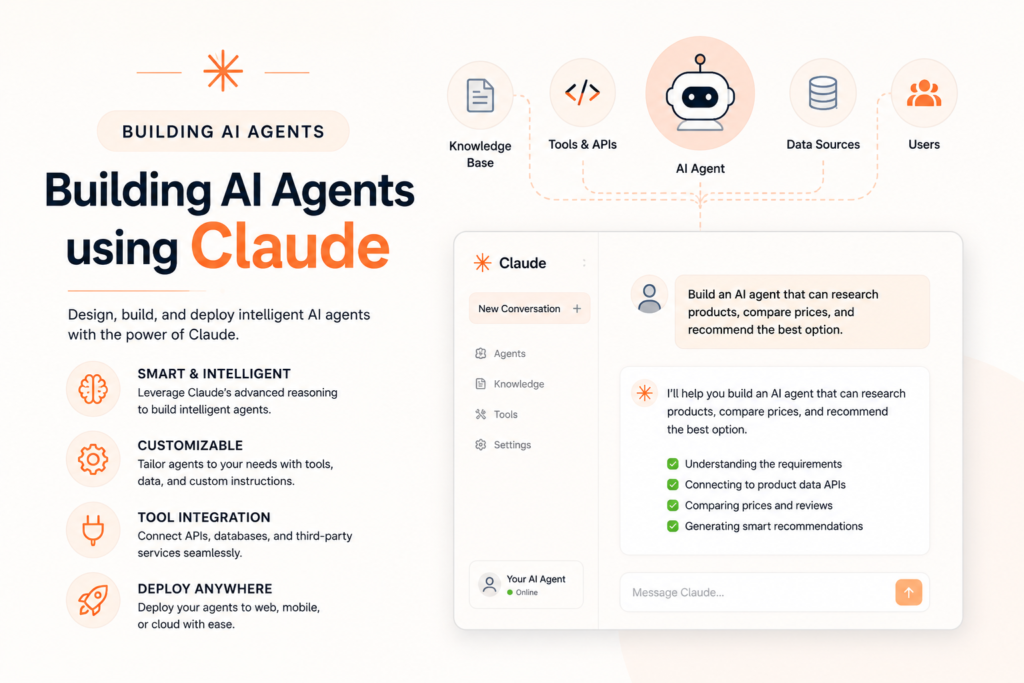
AI agents are systems that can perform tasks automatically using AI.
Claude AI can help build:
* Customer support bots
* Research agents
* Automation systems
* AI assistants
* Productivity tools
Example prompt:
“Create a Python AI agent that reads emails and summarizes important tasks.”
Claude can generate:
* Python scripts
* API integration code
* Logic flow
* Error handling
* Deployment steps
Professionals usually combine Claude AI with:
* Python
* APIs
* Databases
* Automation tools
# Building Applications with Claude AI

Claude AI can also help build full applications.
Examples:
* Portfolio websites
* AI startups
* Dashboards
* Productivity apps
* AI-powered tools
* E-commerce platforms
A professional approach is:
1. Start with planning
2. Create UI design
3. Build frontend
4. Build backend
5. Add database
6. Test the application
7. Optimize performance
Instead of asking for everything at once, professionals build section by section.
# Using Claude AI for Content Writing
Claude AI is excellent for:
* Blog writing
* SEO articles
* Email writing
* Scripts
* Social media content
* Business content
A smart method is to ask Claude for:
1. Outline first
2. Then detailed sections
3. Then SEO optimization
4. Then proofreading
This produces more natural and organized content.
# 3. Customizing Your Experience
Professional users customize Claude AI according to their workflow.
## Create Prompt Templates
Instead of writing prompts repeatedly, save templates.
Example coding template:
“Act as a senior full-stack developer. Write production-level clean code with comments, optimized performance, responsive design, and security best practices.”
This saves time and improves consistency.
# Use Iteration
Professionals rarely accept the first output.
They improve results by asking:
* “Make it more professional.”
* “Optimize performance.”
* “Simplify the explanation.”
* “Improve the UI design.”
* “Add animations.”
* “Reduce code complexity.”
Claude AI becomes more powerful through multiple refinements.
# Organize Conversations by Project
Keep separate chats for:
* Coding projects
* Research
* Content writing
* Startup ideas
* AI agents
This helps Claude maintain better context.
# Combine Claude AI with Other Tools
Many professionals combine Claude AI with:
* VS Code
* GitHub
* Figma
* Notion
* Python
* APIs
* Cloud platforms
Claude becomes much more useful when connected to a real workflow.
# Best Practices for Professional Results
## Be Specific
Detailed prompts produce better answers.
## Use Clear Goals
Always explain:
* What you want
* Why you need it
* Expected output format
Large tasks should be divided into sections.
## Review AI Outputs
Do not blindly trust AI-generated content. Always:
* Check facts
* Test code
* Verify logic
* Improve formatting
# Final Thoughts
Claude AI is much more than a simple chatbot. When used professionally, it becomes a powerful assistant for coding, research, automation, writing, and building AI-powered applications.
The biggest difference between beginners and professionals is not the AI itself. It is the way they communicate with the AI.
Good prompting, structured workflows, project organization, and continuous refinement can dramatically improve the quality of results.
If used correctly, Claude AI can save hours of work, improve productivity, and help turn ideas into real projects faster than ever before.
Best AI Tools 2026: https://www.genaiquant.com/best-ai-tools-in-2026-top-artificial-intelligence-tools/
For more articles click: https://www.genaiquant.com